Evaluating the Daily Weekly Monthly Goal Planner for Personal and Professional Organization
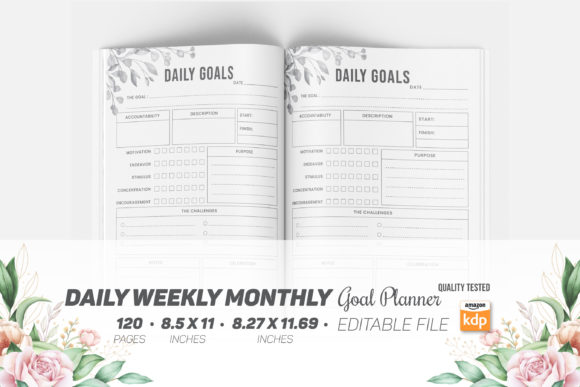
Selecting an organizational system is rarely about finding a single perfect tool; it is usually about identifying a structure that aligns with your current cognitive load and professional demands. The Daily Weekly Monthly Goal Planner represents a specific tier of analog productivity resources designed to bridge the gap between high-level strategic planning and granular task execution. Unlike standard calendars that focus solely on time-blocking, or simple notebooks that lack structural guidance, this format integrates three distinct temporal horizons into a unified 120-page volume. For adults aged 20 to 50 navigating career transitions, business growth, or personal development, understanding the specific utility and limitations of this planner type is essential before committing to a purchase or a digital download.
Distinguishing Features of Integrated Goal Planning Systems
The primary distinction of a Daily Weekly Monthly Goal Planner lies in its hierarchical alignment. Many professionals struggle because their long-term objectives exist in one application while their daily tasks reside in another, creating a disconnect between intention and action. This planner format forces a visual and physical connection between these layers. The monthly spread provides the strategic container, the weekly view offers tactical adjustment space, and the daily pages handle operational execution. When evaluating this resource, it is important to recognize that the value proposition is not merely paper and ink, but the enforced discipline of cascading goals.
Furthermore, the technical specifications of available templates significantly impact usability for those who intend to print at home or utilize print-on-demand services like KDP. High-quality iterations of this planner typically include dual-format support, offering both A4 (8.27″ x 11.69″) and Letter (8.5″ x 11″) sizes. This versatility is crucial for international users or those with specific binding preferences. The inclusion of editable source files (EPS, PDF) alongside ready-to-print versions allows for customization that pre-bound commercial planners cannot offer. Users can adjust margins, add proprietary branding, or modify prompts to better suit niche workflows, transforming a generic product into a bespoke productivity system.
Comparing Analog Hierarchical Planners Against Digital Alternatives
In an era dominated by project management software and calendar apps, choosing a physical or printable Daily Weekly Monthly Goal Planner requires a deliberate tradeoff analysis. Digital tools excel at automation, reminders, and collaboration. However, they often suffer from feature bloat and notification fatigue. The analog format discussed here offers "friction as a feature." The act of manually transcribing goals from monthly to weekly views serves as a cognitive filter, preventing overcommitment in ways that drag-and-drop digital interfaces do not.
When comparing this planner style against other analog options, such as bullet journals or standard diaries, the structured goal planner reduces setup time. Bullet journaling offers ultimate freedom but requires significant upfront design effort and consistency to maintain structure. Conversely, standard diaries provide structure but often lack dedicated goal-tracking real estate. The Daily Weekly Monthly Goal Planner occupies the middle ground: it provides pre-defined scaffolding for goal decomposition without requiring artistic skill or hours of layout creation. For professionals who need immediate functionality without the learning curve of complex systems, this balance is often the deciding factor.
Assessing Technical Quality and Print Readiness
For users purchasing digital files to create their own physical copies or to publish via KDP, technical specifications are as important as content layout. A common failure point in lower-quality planners is improper bleed settings. Professional-grade Daily Weekly Monthly Goal Planner templates must include separate files for bleed and no-bleed configurations. Bleed ensures that when the document is trimmed during binding, no white borders appear at the edges, which is critical for a polished, retail-ready appearance. Files lacking proper bleed zones often result in amateurish outputs that undermine the perceived value of the planner.
Additionally, resolution and file format diversity matter. The inclusion of high-resolution JPEGs alongside vector-based EPS and PDF files provides flexibility across different use cases. Vector files allow for infinite scaling without pixelation, essential for those who may wish to resize elements or repurpose graphics for marketing materials. Rasterized JPEGs serve as quick previews or low-stakes print tests. When evaluating a product listing, verify that the package includes at least 120 pages of content with consistent formatting across all three time horizons. Inconsistent page counts or missing sections in the daily, weekly, or monthly breakdowns can render the system unusable for long-term tracking.
Strengths and Limitations in Practical Application
Understanding where the Daily Weekly Monthly Goal Planner excels helps prevent buyer’s remorse. Its greatest strength is visibility. Having 120 pages dedicated to a unified cycle allows users to see progress trends over several months without flipping through multiple notebooks or scrolling endlessly through app history. This continuity supports habit formation and project post-mortems. The structured nature also aids in reducing decision fatigue; users do not waste mental energy deciding how to organize their day because the framework dictates the flow.
However, there are inherent limitations. Rigidity is the most significant tradeoff. If your workflow changes drastically week to week, a fixed-layout planner may feel constraining compared to a blank notebook or flexible digital tool. Additionally, the 120-page count, while substantial, implies a finite lifespan. Users must plan for migration or repurchase, whereas digital tools offer infinite storage. Another limitation is the lack of searchability. Retrieving a specific note from three months prior requires manual indexing or memory, making this format less suitable for knowledge management-heavy roles where information retrieval is paramount.
Determining Fit: Who Benefits Most from This Format?
The Daily Weekly Monthly Goal Planner is not universally optimal. It is best suited for individuals who have clear objectives but struggle with execution consistency. Freelancers, solopreneurs, and students often find this format superior to corporate-style agendas because it centers on personal output rather than meeting schedules. The integration of goal-setting prompts directly adjacent to scheduling spaces encourages outcome-oriented planning rather than mere busyness.
Conversely, this format may be ill-suited for those in highly reactive environments where long-term planning is frequently derailed by emergencies. Emergency responders, shift workers with rotating schedules, or executives whose days are entirely dictated by others may find the goal-decomposition features frustratingly unused. In such cases, a simpler time-blocking pad or a purely digital calendar with robust alert systems may be more appropriate. Similarly, minimalists who prefer carrying only a pocket-sized notebook will find the A4 or Letter size cumbersome. The physical footprint of this planner demands desk space or a dedicated bag, which is a logistical consideration for commuters.
Making an Informed Selection Based on Customization Needs
For those considering the editable source file versions, the decision should hinge on technical capability and intended use. Access to EPS and editable PDF files transforms the Daily Weekly Monthly Goal Planner from a static product into a platform. If you intend to sell planners on KDP, having exclusive rights to edit and differentiate your cover and interior layouts is non-negotiable to avoid duplicate content penalties. Even for personal use, editability allows you to remove irrelevant sections or add industry-specific trackers, increasing the tool's relevance.
However, if you lack design software or the inclination to modify layouts, prioritize "Ready to Upload" or "Print Ready" PDF versions. These files have been pre-flattened and checked for printing errors, reducing the risk of wasted paper and ink. Evaluate whether the included 6 JPEG and 6 PDF preview files accurately represent the interior quality before purchasing. High-quality previews should show actual page spreads, not just mockups, allowing you to assess line weight, font readability, and writing space adequacy. Ultimately, the right choice depends on whether you value immediate utility or long-term adaptability. By weighing these factors against your specific organizational pain points, you can determine if this integrated planning system warrants the investment of both money and daily attention.